
Assets registered1,284
Assets & hierarchy
Machines, panels and meters in a location tree; QR labels, documents, warranty and cost per asset.
The maintenance, SCADA and energy platform for Indonesian plants — CMMS, a drag-and-drop SCADA designer with real-time monitoring and alarms, energy per machine and per-part traceability, with an Android app for technicians and operators.
Four modules, one set of data — from the PLC signal to the technician's work order
Machines, panels and meters in a location tree; QR labels, documents, warranty and cost per asset.
Corrective, preventive, predictive; assign to a technician or a team, SLA by priority, digital signature.
By time, running hours or both; meters are read from the PLC automatically.
Stock, use per work order, reorder list, stock counts and purchase orders with approval.
Modbus TCP, Mitsubishi MC Protocol, MQTT, OPC UA, Siemens S7 and BACnet/IP through a collector on the plant floor.
Draw your own mimic screens from a symbol library; tag values move in real time.
HH/H/L/LL, acknowledge, shelve, deadband; multi-level escalation to the on-call team.
Every tag's history kept in TimescaleDB; compare trends across machines.
Worked out from each machine's kWh counter every 10 minutes, robust to meter resets.
30-minute, hourly and daily reports by machine and production line.
Cost from the tariff per kWh, ready to compare with production output.
Estimated emissions from the grid factor, by line and by month.
Every trigger from the PLC stores the part's serial number with its process data.
Oven temperature, paint pressure, cycle time — recorded with the serial number.
Search a serial number and see the process conditions when that part was made.
Export traceability data to Excel for audits and customer claims.
AssetGrid SCADA Designer
Build HMI screens in the browser — drag-and-drop, no code, no separate engineering licence
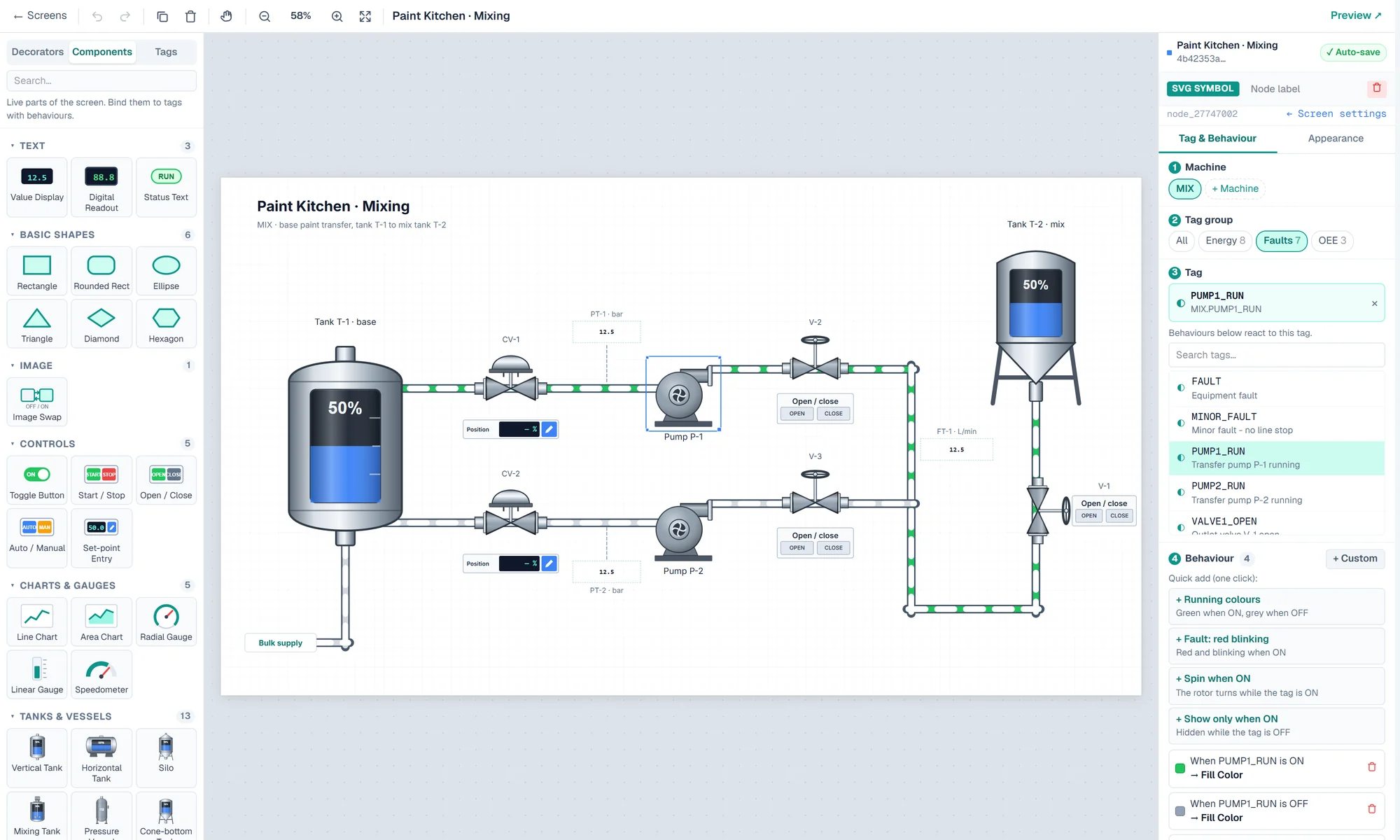
Tanks, pumps, valves, motors, conveyors, robots, boilers, transformers, stack lights — plus your own SVG symbols.
Drop a tag on the canvas and it becomes a lamp or a readout with its unit; drop it on a symbol to bind it.
One-click presets — running colours, red blinking fault, spin, flow, level fill — or condition → action rules with multi-tag formulas.
Start/stop pushbuttons, toggles and set-points with min/max checks, written to the PLC and confirmed — every write logged.
Radial and linear gauges, speedometers, live trends from tag history, and flow animation on pipes and lines.
The same screens run in the browser and in the Android app, linked screen-to-screen. Auto-saved, with undo.
Connects to the machines you already have
One set of asset data, seen through each team's needs
The whole plant, at any time.
Machine availability, OEE, maintenance backlog, cost and energy on one screen — without waiting for the month-end report.
Plan the work, don't fight fires.
PM schedules from calendar time and running hours, predictive work orders from sensors, and a backlog you can actually see.
The next job is always clear.
The Android app: scan an asset's QR code, open its history, work the checklist, log parts and sign off — even when the signal drops.
Every tag, every alarm, every kWh.
Connect PLCs, draw HMI screens, set up alarms and escalation, and see energy use per machine and per line.
Meet the AssetGrid modules
AssetGrid CMMS
Assets in a location hierarchy, corrective–preventive–predictive work orders, PM schedules, checklists, spare parts and purchase orders. Every labour hour and part goes into the asset's cost.
AssetGrid SCADA
The collector reads the PLCs on the plant floor and keeps the data while the network is down. HMI screens you draw yourself move in real time, and setpoints can be sent back to the machine with confirmation.
AssetGrid Alarm
HH/H/L/LL, digital and data-quality alarms with priorities. Acknowledge, shelve and flood suppression keep the panel calm; multi-level escalation calls the on-call team when nobody responds.
AssetGrid Energy
Consumption is worked out from every machine's kWh counter and summarised by line, hour and day. Cost and CO₂ are calculated automatically, ready to compare with production output.
AssetGrid Trace
When the PLC signals, AssetGrid stores the part's serial number with its process data — temperature, pressure, cycle time. When a customer asks, the answer is one search away.
AssetGrid Android
Technicians scan an asset's QR code, open the work order, work the checklist and log parts — and keep working when the signal drops. Operators see HMI, alarms and Andon in their hand.
How AssetGrid works
SCADA spots the problem, the CMMS fixes it — and every minute is on record
A collector reads the PLCs on every line.
Problems show up before the line stops.
From a machine signal, not a phone call.
Technicians work from the Android app.
Every minute and every rupiah on record.
Print labels in bulk; scan one to open the asset and its history.
Running hours and cycles are read automatically for meter-based PM.
Problem, cause and remedy per work order, ready for analysis.
Urgent work nobody has picked up goes straight to whoever is on call.
Each PM schedule's parts are ready before the job starts.
Availability, performance and quality per line, and an Andon board.
Locations, assets, spare parts and PM schedules from xlsx or csv.
A REST API with scoped keys and HMAC-signed webhooks.
The screens on this page are illustrations with sample data.
Maintenance planned from machine data, not from memory
Admin, maintenance manager, technician, requester — each with their own access.
Authenticator codes, sign-in attempt limits and one session per user.
Several plants on one subscription, each site's data kept apart.
Who changed what: the value before and after, field by field.
Run it in the cloud or on the plant's own server with Docker.
Every command to a PLC is logged: sent, confirmed or failed.
API keys with limited permissions and a 120-requests-per-minute limit.
Alarms and work orders reach the right people.
Every plant is different: AssetGrid is scoped and quoted for each site — its machines, PLCs and teams. Book a demo for your maintenance, control-room and energy teams, or sign in to carry on with your work.
AssetGrid is the maintenance, SCADA and energy platform for plants in Indonesia: a CMMS for assets and work orders, real-time machine monitoring and alarms, energy use per machine and per-part traceability — on one set of data, with an Android app for technicians and operators.
The AssetGrid collector speaks Modbus TCP, Mitsubishi MC Protocol, MQTT, OPC UA, Siemens S7 and BACnet/IP. It sits on the plant network and keeps the data while the connection to the server is down.
Yes. Start with assets, work orders and PM; connect the machines to SCADA later. Once the PLCs are connected, meters and alarms start raising work orders automatically.
The Android app for technicians: scan the asset QR, work the checklist with photos, log parts and sign off. Work is kept when the signal drops and sent as soon as it is back.
Per customer. Every plant is different, so we scope AssetGrid for each site — the modules you need, the number of machines and PLCs to connect, the users, and cloud or on-premise — and send a quotation after a demo and a site survey.
In our cloud or on your plant's own server (on-premise, with Docker). Tag history lives in TimescaleDB, and every change to maintenance data is in the audit trail.
Book a demo at [email protected]. Our team helps map your assets, install the collector, connect the PLCs and train your maintenance and control-room teams.
